FundVision Tools - Tradepp


Disclaimer: Click here to read the Disclaimer. Your use of this service is your acknowledgment that you have read, understood and accepted the disclaimer.


Introduction

This page gives information about the 'pre-processor' program I coded for enhancing the functionality of the programming language 'trade'. It also let's one download the pre-processor program (tradepp) for his/her personal use.


Why did I code the pre-processor 'tradepp' ?

While coding some scripts in 'trade' I wanted to do certain looping operations. Unfortunately 'trade' does not contain the functionality of 'loop'. At first I decided to live with it, but while coding 'MERWIN' I once again found that I absolutely needed this functionality. That's when I decided to do something about it. To take care of my need, I coded 'tradepp' !


Enhancements done in 'tradepp'

In short, following are the enhancements offered by 'tradepp'

  • Functionality of 'loop'
  • Functionality of 'command line parameters substitution'
  • Functionality of 'multi-line comments'


How does 'tradepp' work ?

The program 'tradepp' works like a typical pre-processor. (Those who are familier with 'tradefr' program of Steve Munger will have no difficulty in understanding this concept.) A typical pre-processor processes an input file which contains the syntax/enhancements of the pre-processor and it creates an output file which has the syntax of the enhancements interpreted. (Which is then onwards processed by the actual language processor.)

To be specific (and getting right down to the details), 'tradepp' takes it's input from a file with extension .mfv and creates an output file with extension .ini. The .mfv is very very similar to .ini file, except that it contains the syntax for the enhancements offered by the 'tradepp' and the resulting .ini file contains just the syntax which can be processed by the program 'trade'.

To further describe the process, here's the picture of a typical process ===>


Loop functionality

The loop functionality basically repeats few programming statements again and again with a certain change.

At present two different types of loops are supported by 'tradepp'.

  • 'fund' loop
  • 'counter' loop
Fund Loop

This loop repeats given programming statements for each 'fund' in a 'family'. Consider the following .mfv file. It is a small example of how a typical ForFund loop looks (and works).
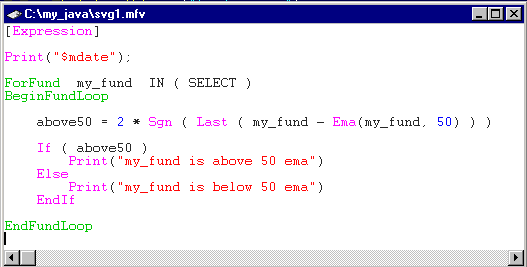


As in the example, the line starting with 'ForFund' defines a variable 'my_fund' for the family SELECT. This loop repeats the statements within the pair of 'BeginFundLoop' and 'EndFundLoop' for every fund in the family SELECT. For each repeatition, the variable 'my_fund' is substituted by the actual ticker of the fund in family SELECT. The resulting svg1.ini file produced by the 'tradepp' program when operated on svg1.mfv will be ===>
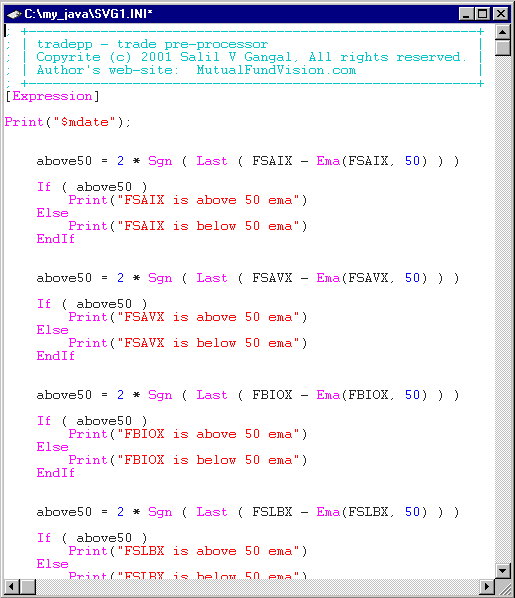


As we can see, the syntax ForFund/BeginFundLoop/EndFundLoop is interpreted by the 'tradepp' and the output produced contains just the syntax that can be processed by 'trade'.


Counter Loop

This loop repeats given programming statements for each 'counter' variable going from 'start value' upto 'end value' with each repetition the 'counter' variable is incremented by 'increment' variable. Consider the following code-fragment from a .mfv file. It is a small example of how a typical ForCounter loop looks (and works).
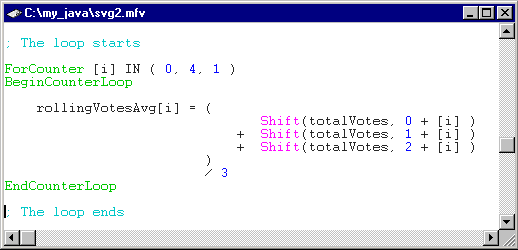


As in the example, the line starting with 'ForCounter' defines the 'counter' variable [i], the 'start value' 0, the 'end value' 4 and the 'increment' 1. This loop repeats the statements within the pair of 'BeginCounterLoop' and 'EndCounterLoop' for every repetition, the 'counter' variable is substituted with the appropriate value. For the example above that will be 0, 1, 2, 3 and 4. The resulting code-fragment from svg2.ini file produced by the 'tradepp' program when operated on svg2.mfv is ===>
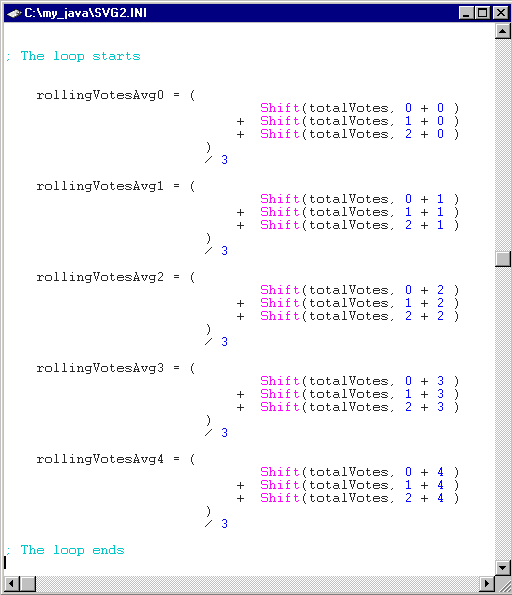


Again, as before, the syntax ForCounter/BeginCounterLoop/EndCounterLoop is interpreted by the 'tradepp' and the output produced contains just the syntax that can be processed by 'trade'.


Date Loop

At present this type of loop is not implemented. When I find time, I will work on this. (As the name suggests, this loop will do date increment and decrement.)


Enumeration Loop

At present this type of loop is not implemented. When I find time, I will work on this as well ! And as the name suggests, this loop will be for the enumeration defined by the user. If there is a need to repeat certain code-fragment for user defined variables (say Fibonacci numbers !) then such a loop may come in handy !


Command Line Parameters Substitution Functionality

This functionality allows one to substitute the variables in a .mfv file by the command line parameters values. (Those who are familier with 'tradefr' program of Steve Munger will find it exactly the same as in 'tradefr'.)

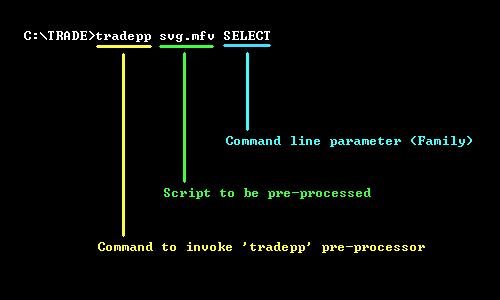
The variables given as |0|, |1|, |2|, ... are substituted by the command line parameters which follow the 'tradepp' after the .mfv file name.

I assume that most who use 'trade' will already be familier with this so I'll not describe the details.


Multi-line Comments Functionality

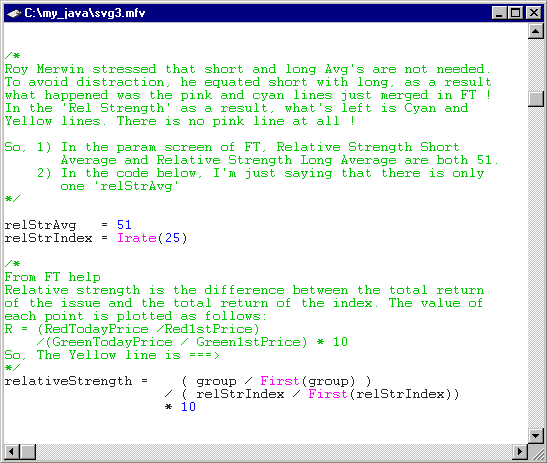
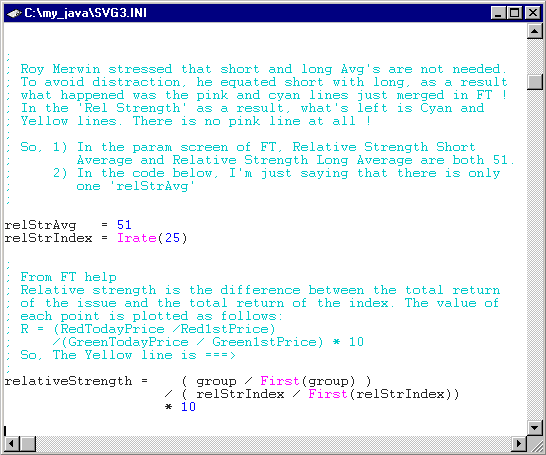
Trade has just single line comments. All characters in a line after character ; are considered as comment. The multi-line comments functionality enhances this. This functionality allows one to start multi-line comments by the character sequence /* and end the multi-line comments by the character sequence */. Typically these character sequences are by themselves on line when writing multi-line comments.

Example of the starting .mfv file and resulting output .ini file from 'tradepp' are given below.

The svg3.mfv file ===>


The svg3.ini file ===>


Disadvantages of 'tradepp'

The major dis-advantage 'tradepp' has is that it is just a pre-processor. So any state that occurs at 'run-time' is not / can not be understood by 'tradepp'. To elaborate this a little, consider a script which is first creating (say) a family 'buyList' and later the same program is processing the securities within this 'buyList' family one at a time. Since 'buyList' is created at the runtime, any action that involves pre-processor will not be available. Hence, if one wants to create a 'buyList' and later wants to write a ForFund loop of 'buyList', then it won't work.

'Tradepp' has been tested only for FastTrack in Windows environment. I know that there are some users who use DOS version of FT, in such environment the program will not work.


Limitations of 'tradepp'

  • 'Tradepp' is a Windows program. It is designed to run from DOS prompt, but it is not a DOS program. It may not work for DOS version of FastTrack.
  • At present 'tradepp' handles only one one ForCounter loop. (I will work on removing this limitation, when I find time.)
  • At present the ForFund and ForCounter loops cannot nest one another. If one writes nesting loops, 'tradepp' will not be able to produce desired results.
  • At present 'tradepp' cannot handle the syntax where (say) the ForFund/BeginFundLoop/EndFundLoop and the statements within are coded in one single loooong line. It is supposed to handle them in a correct manner when they are on different lines.
  • Nesting of multi-line comments is not supported. This limitation will stay forever. I'll not make any attempt to make 'tradepp' handle nesting of multi-line comments. (The major programming languages such as C, Java, PL/SQL also have this limitation.)


Disclaimer and Copyright

The current version of 'tradepp' is just a beta version. It has been tested only on two computers. Typically a lot of testing using many different computers and different versions of Windows is necessary, but due to lack of resources, this is the only testing that I can do. 'Tradepp' works for me, but it may or may not work for folks who may download this.

Please read carefully the disclaimer hyperlinked near the top of this page and within here and download the 'tradepp' program only if you understand the disclaimer and agree with it. Please note that this program is provided on 'as is' basis. MutualFundVision / FundVision / Salil V Gangal expressly disclaims all the warranties, expressed or implied, including but not limited to warranties of merchantability and fitness for a particular use or purpose.

After nearly a decade I've coded a program under Windows environment for general use (as against my own use). I am not sure that this program will work without flaws on computers other than mine ! I hope to complete the beta test and move on to next version in about two months. So the current version available here will expire in two months. The very latest version will expire on 28-NOV-2004.

Please note that this prgram is not (yet) cheat-proof. If one codes ForFund, or something in a comment, or tries to do something unusual, the program may crash. If (and when) I find time, I'll make it more robust. For now, the program works (or has worked) when the syntax I gave in the examples above is followed.

This program, as distributed in 'tradepp.zip' is copyrighted by Salil V Gangal. The users are authorized to use the program for their personal use only. Any re-distribution of 'tradepp.zip' and/or its contents is strictly prohibited. Any reverse-engineering/dis-assembly/modification of any of the contents of 'tradepp.zip' is strictly prohibited.

Dated: July 22, 2001.


Pre-requisite

It is necessary to have following on the computer where one intends to use 'tradepp'

  • A valid FastTrack installed in a directory 'FT' which is immediately under the root directory of the drive.
    (For example, C:\FT or D:\FT or E:\FT ...)

  • Unzip and install the contents of the tradepp.zip file in any directory immediately under the root directory of the drive on which FastTrack is installed.
    (For example, C:\TRADE or D:\TRADE or E:\TRADE ... or ... C:\TRADE_FILES, D:\TRADE_FILES, E:\TRADE_FILE ...)

  • Download and install the program 'trade.exe' by Ed Gilbert in the same directory as above. (Click here to surf to Ed Gilbert's site.)


Typical Command Line

Following is how a typical command line looks like at the DOS prompt for working with 'tradepp'.


New Version as of 09/19/2001

This version of tradepp is enhanced to process infinite number of non-nested ForFund loops.

Also, this version executes the .MFV file without the need to invoke 'trade' program. This version of tradepp offers a single-step execution similar to what's present in the 'tradefr' program.


Download and Support

Click here to begin Download of 'tradepp.zip'.

As a reminder, please be sure to read the disclaimer and pre-requisites.

Click here to surf to the FVDB, where you may post your questions and I'll offer support as the time permits.


Last but not the least - Credits

I thank my wife for the programming help she offered while I was coding 'tradepp'.

Thanks are in order to Sidney Kaiser, Tim O'Sullivan, Steve Munger and of course Ed Gilbert who inspired me.

And I thank Roy Merwin, whom I've never met or have never exchanged e-mails with, but whose algorithm created the need of enhancing the language trade in the first place !


Copyright © 2000 Salil V Gangal, All Rights Reserved.